🧵 Why JS Thread Blocking Causes Scroll Jank
If you’ve built a real React Native app, you’ve probably seen this:
👉 The list scrolls
👉 FPS drops
👉 Touch feels delayed
👉 UI looks “heavy”
Most developers blame FlatList.
But FlatList is rarely the real problem.
The JS thread is.
Let’s break down what actually happens — end to end.
🧠 First: How Scrolling Works in React Native
At runtime, a React Native app is split across threads.
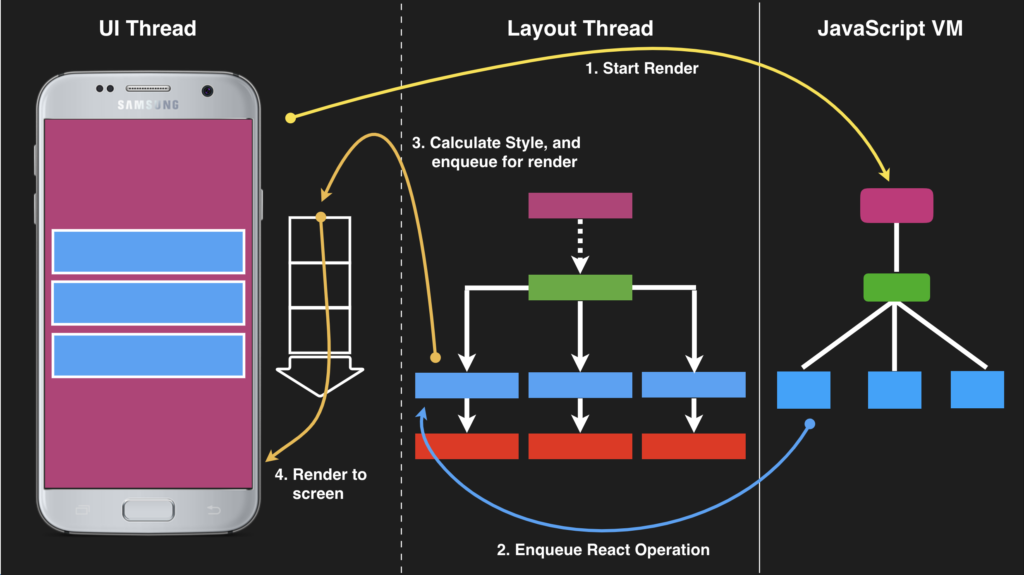
-
Handles touch events
-
Scroll physics
-
Drawing pixels
-
Talks directly to iOS / Android OS
🟨 JS Thread
-
Runs React code
-
Executes
renderItem -
Handles state updates
-
Runs business logic
📌 Key rule
Scrolling itself happens on the native thread
…but what appears on screen depends on the JS thread
🤔 So Why Does Scrolling Jank Happen?
Because scrolling is not just movement.
Every scroll frame may require:
-
New items to appear
-
Old items to disappear
-
Layout to be calculated
-
Data to be processed
And that work depends on JS.
If JS is busy → native thread waits → frames drop.
❌ FlatList Myth #1
“FlatList is virtualized, so performance is guaranteed”
Not true.
FlatList is configurable virtualization, not magic.
By default:
-
It renders more items than you expect
-
It keeps items mounted for safety
-
It prioritizes correctness over performance
Virtualization only works well if you tune it.
🧩 What Happens Internally When FlatList Scrolls
Let’s walk through a scroll step by step.
1️⃣ User scrolls
-
Native thread handles touch
-
Scroll offset changes
2️⃣ Visibility window changes
-
New items enter the viewport
-
Old items exit
3️⃣ JS thread is asked to help
-
renderItemis called -
Props are prepared
-
Layout info is calculated
4️⃣ React reconciliation
-
New virtual tree created
-
Old vs new diffed
-
Changes committed
5️⃣ Native views updated
-
Only if JS finishes in time
⚠️ If JS is slow at any step → scroll stutters
🧵 Why the JS Thread Gets Blocked
Common causes:
❌ Heavy renderItem
❌ Inline functions & objects
-
New references every render
-
Breaks memoization
❌ Logging during render
❌ State updates on scroll
-
Re-render storms
❌ Large images decoding
-
Especially on Android
📱 Old vs New Architecture (Important Context)
🧱 Old Architecture (Bridge-based)
-
JS → Native communication was async
-
Serialization overhead
-
JS delays were amplified
Scroll jank was much easier to trigger.
🧩 New Architecture (Fabric + JSI)
-
Faster scheduling
-
Less overhead
-
Better view recycling
✅ Scrolling is smoother
❌ But JS thread blocking still causes jank
No architecture can render what JS hasn’t prepared yet.
❌ FlatList Myth #2
“More data = worse performance”
Wrong.
Performance depends on:
-
How many items are rendered
-
How expensive each render is
-
How often re-renders happen
10,000 items can scroll smoothly
50 items can jank badly
🛠️ Solutions (What Actually Works)
✅ 1. Keep renderItem Pure & Cheap
-
No side effects
-
No calculations
-
No logs
✅ 2. Tune Virtualization Settings
What these do:
-
initialNumToRender→ first paint cost -
windowSize→ how many screens stay mounted -
removeClippedSubviews→ unmount off-screen views
✅ 3. Avoid State Updates During Scroll
❌ Bad:
✅ Better:
✅ 4. Pre-measure When Possible
If item height is fixed:
This skips layout calculations entirely.
✅ 5. Reduce Image Cost
-
Serve resized images
-
Avoid decoding large bitmaps during scroll
-
Use placeholders
🔁 When FlatList Is NOT Enough
For extremely large or complex lists, consider alternatives:
🚀 FlashList (Shopify)
-
More aggressive recycling
-
Better defaults
-
Drop-in replacement for FlatList
🧠 RecyclerListView
-
Predictive rendering
-
Requires layout definitions
-
Excellent for huge datasets
These libraries exist because FlatList optimizes for safety, not maximum speed.
💡 Final Mental Model
Scrolling is native.
Rendering is JavaScript.
Smooth lists need both to cooperate.
If the JS thread is blocked:
-
Native can scroll
-
But it can’t show new content
-
Result = jank
✅ Final Takeaway
FlatList is not slow.
Blocked JS threads are.
Once you:
-
Keep renders cheap
-
Avoid unnecessary re-renders
-
Tune virtualization
-
Respect the JS thread
FlatList becomes fast, predictable, and smooth — even at scale.

Comments
Post a Comment